Quota Management
3.1 Quota Enforcement
When attempting to create, start, or stop a Quantum Emulator, the system checks current usage against the defined limits. If a quota is exceeded:
CPU exceeded (when attempting to create, start an emulator):
“Available quota exceeded, please stop or delete running Quantum Emulators”.
Stopped limit exceeded (when attempting to stop an emulator):
“You have too many stopped notebooks, please restart or delete another Quantum Emulator to continue”.
These restrictions help prevent resource exhaustion and ensure high availability for all users.
3.2 User Consumption
The Quantum Service enforces a quota system to ensure fair resource distribution among all users. Each registered user is assigned a fixed resource limit, which is monitored continuously during service usage. Users can view their resource consumption in the “My Consumption” section accessible from the top header menu or via the user account button with dropdown located in the top-right corner.
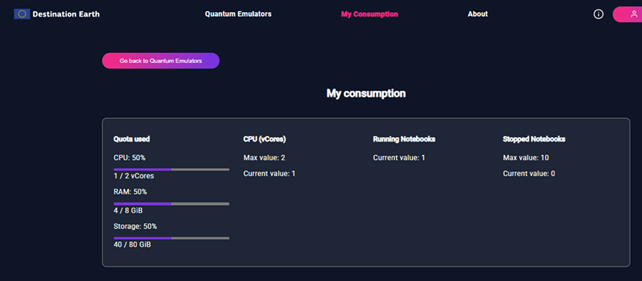
Figure 6 – User Consumption
3.3 Status-Based Real-Time Resource Calculation
User resource usage is monitored in real-time. The application calculates consumption based on the current state of each Quantum Emulator. The system applies resource-specific logic depending on the emulator’s status.
This calculation ensures accurate tracking of consumed resources, including during transitional states like startup or shutdown.
The system determines resource consumption using the following status categories:
CPU and Storage usage are counted for emulators in states: “running”, “initializing”, “pending”, “starting”, “failed”.
RAM usage is only counted when an emulator is running.
Stopped Emulators count includes emulators to which the “Stop” action has been applied. This includes transitional statuses “finalizing”, “stopping” and final status “stopped”.
This data is aggregated and presented visually in the My Consumption section, showing usage bars and labels for:
CPU usage
RAM usage
Storage usage
Number of stopped and running emulators
3.4 Default Quota Limits
The following resource limits are applied by default:
CPU: Maximum of 2 vCores
RAM: Maximum of 8 GiB
Storage: Maximum of 80 GiB SSD (temporary local storage)
Stopped Quantum Emulators: Up to 10
Note: There is no maximum limit for the amount of running notebooks, but CPU and RAM usage must remain within the defined caps.