6. Shows
A Show is a scene made of Canvases, Layers and Data Sources displayed in the current session.
It can show multiple phenomena on the globe in the 3D, gathering and presenting information from multiple sources.
6.1. Show Sub-Menu
- The Show Menu provides options to manage the shows. In includes:
New Show to create new show. Selecting this item resets the data visualization to the default view.
Load Show to load a show from local storage.
Save Show to save the current show locally.
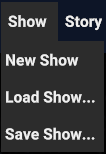
Fig. 6.1 Show Sub-Menu
When loading another show, all unsaved data of the current one are lost. It’s recommended to save any progress to avoid unwanted losses.