Harmonised Data Access (HDA)
The Harmonised Data Access (HDA) service provides access to the DestinE Data Portfolio, including Climate DT outputs, through a STAC-compliant API.
STAC (SpatioTemporal Asset Catalog) is a widely adopted standard for the description, discovery, and access of geospatial data. By exposing Climate DT datasets through STAC, HDA enables users to discover and access Climate DT simulations using a common interoperability framework that is already supported by numerous geospatial tools, libraries, and platforms.
This approach facilitates the integration of Climate DT simulations with other Earth observation, climate, environmental, and geospatial datasets, allowing users to build workflows that span multiple data sources while relying on a standard metadata model and access interface.
In STAC, a collection is a dataset, or a group of closely related datasets, described through a common set of metadata. In the context of Climate DT, HDA collections correspond to the available simulation datasets and provide the metadata needed to discover, filter, and retrieve the associated Climate DT data.
More detailed information on the HDA service is available in the Destination Earth Data Lake documentation.
Prerequisites and access methods
Prerequisite
A DestinE Platform account with upgraded access is required. Apply for upgraded access here.
There are several ways to access and use the HDA API:
On your local machine
Python 3.9 or later, together with one or more Python libraries such as Requests, PySTAC, or EODAG; or
curlfor command-line access.
Through Insula Code or the DestinE Data Lake STACK
Browser-based Jupyter environments provided by the DestinE Platform and the DestinE Data Lake, with the required software already available.
Tip
New to the HDA? The Plot any Climate DT parameter notebook is the recommended starting point — it walks through discovering, retrieving and plotting Climate DT data. See Example notebooks for the full set.
Climate DT Discovery and Access Workflow
The typical workflow consists of:
Discover the available Climate DT collections and identify the simulation of interest.
Explore the collection metadata and/or queryables endpoints to select the variables and time range of interest.
Submit an HDA search request using the selected parameters.
Submit the resulting Order Payload to place an order.
Download or analyse the returned assets.
Alternatively, if you already have an Order Payload, you can submit it directly to the Order API and proceed straight to the download step.
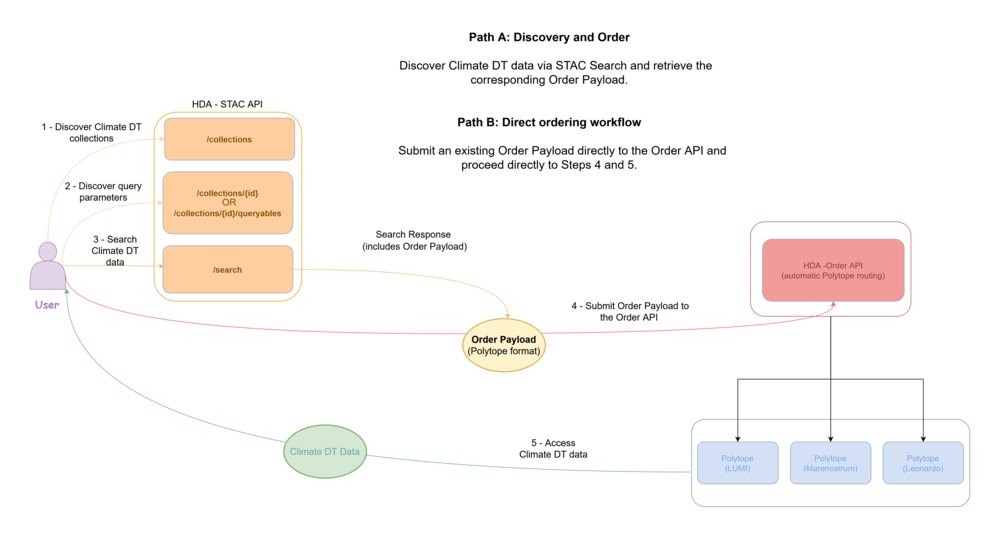
Relationship between Climate DT simulations, HDA collections and user workflows.
Authentication
A DestinE Platform authentication token is required to use HDA. The
recommended way is to use the destinelab library:
import destinelab as deauth
import requests
import json

auth = deauth.AuthHandler(DESP_USERNAME, DESP_PASSWORD)
access_token = auth.get_token()
auth_headers = {"Authorization": f"Bearer {access_token}"}
Sample request
The following example searches a Climate DT collection for a single set of parameters:
HDA_STAC_ENDPOINT = "https://hda.data.destination-earth.eu/stac/v2"
COLLECTION_ID = "EO.ECMWF.DAT.D1.DT_CLIMATE.G2.PROJECTIONS_SSP3-7.0_IFS-FESOM.R1"

hdaFilters = {
    "ecmwf:resolution": {"eq": "standard"},
    "ecmwf:levtype": {"eq": "sfc"},
    "ecmwf:param": {"eq": ["228004"]},
    "ecmwf:stream": {"eq": "clmn"},
    "ecmwf:year": {"eq": ["2030"]},
    "ecmwf:month": {"eq": ["9"]},
    "ecmwf:levelist": {"eq": ["2"]},
}

search_body = {
    "collections": [COLLECTION_ID],
    "query": hdaFilters,
}

response = requests.post(
    HDA_STAC_ENDPOINT + "/search", headers=auth_headers, json=search_body
)
The search returns the matching items but not the data itself: the items then need to be ordered and downloaded (see the workflow figure above). For the complete search, order and download sequence, see the Extract Climate DT data notebook. Further examples are listed in Example notebooks.
Example notebooks
Users can interactively explore the available Climate DT parameters and simulations through the DestinE Data Lake example notebook: ClimateDT-ParameterPlotter.
The Climate DT Parameter Plotter demonstrates how to:
discover Climate DT parameters;
inspect parameter metadata;
browse available scenarios;
retrieve data using HDA;
visualise the selected parameter.
The notebook provides a practical introduction to parameter discovery and data access workflows.
A comprehensive collection of ready-to-run examples is available in the DestinE-DataLake-Lab repository. In particular, the Climate DT notebooks available are:
Notebook |
What it shows |
|---|---|
Browse collections, inspect parameters, retrieve and plot any parameter. Recommended starting point. |
|
Full search, order and download sequence, then plot. |
|
Retrieve Climate DT data time series. |
|
Point time series exploiting the Polytope feature extraction. |
|
Select a Region of Interest and analyse the data. |
|
Build a request from the Queryables endpoint, then order and download. |
The notebooks are developed to run primarily on the DestinE Data Lake JupyterHub environment, which includes Earthkit package versions that could not be updated to the latest version — check the Earthkit package versions used at dedl-python-kernel-packages.
Climate DT simulations are exposed as HDA STAC collections. Inspect the collection metadata and queryables endpoints before building requests.
Some notebooks still use Climate DT Generation 1 datasets because these datasets remain available through HDA. Nevertheless, users are recommended to work with Generation 2 datasets, which represent the current generation of Climate DT data.
Climate DT Collections in HDA
Climate DT simulations are exposed through the Harmonised Data Access (HDA) service as individual STAC collections.
Each collection represents a specific Climate DT simulation and follows a structured naming convention encoding the main simulation attributes. For example, the following collection identifier:
EO.ECMWF.DAT.D1.DT_CLIMATE.G2.PROJECTIONS_SSP3-7.0_IFS-FESOM.R1
follows the naming convention below:
D1identifies the DestinE digital-twin data class;DT_CLIMATEidentifies the Climate DT;G2identifies the simulation generation (Generation 2);PROJECTIONSidentifies the simulation activity;SSP3-7.0identifies the climate scenario;IFS-FESOMidentifies the model;R1identifies the first realization.
This naming convention enables users to quickly identify the simulation characteristics directly from the collection identifier.
To use another model or experiment, change the collection identifier: for
example EO.ECMWF.DAT.D1.DT_CLIMATE.G2.BASELINE_HIST_IFS-NEMO.R1 for the
IFS-NEMO historical simulation. The Plot any Climate DT parameter
notebook lists all available Climate DT collections.
STAC metadata for HDA Climate DT collections
The Harmonised Data Access service exposes Climate DT simulations through a STAC-compliant API. Each collection contains extensive metadata describing the corresponding Climate DT simulation, including:
collection description;
temporal coverage;
available parameters along with their information (
cube:variables);the associated data bridge — LUMI, MareNostrum or Leonardo — (
federation:backends).
Users can inspect the complete metadata associated with a collection by opening the collection endpoint directly. For example: Climate Change Adaptation Digital Twin (Climate Adaptation DT) - Future Projection - IFS-FESOM - Generation-2 - Realization-1
and look at the metadata of one of the available parameters:
"Relative_humidity(clte_pl)": {
  "type": "data",
  "unit": "%",
  "attrs": {
    "url": "https://codes.ecmwf.int/grib/param-db/157",
    "time": "Hourly",
    "stream": "clte",
    "levtype": "pl",
    "encoding": "instantaneous",
    "levelist": "1000,925,850,700,600,500,400,300,250,200,150,100,70,50,30,20,10,5,1",
    "long_name": "Relative humidity",
    "shortName": "r",
    "parameter_ID": "157",
    "product_type": "forecast",
    "standard_name": "Relative_humidity"
  },
  "dimensions": [
    "lat",
    "lon",
    "time"
  ]
}
Discovering Climate DT variables and query parameters
The STAC Queryables endpoint provides a machine-readable description of the dimensions and request parameters available within a Climate DT collection. It can be used to discover which filters are supported and to construct valid HDA search and retrieval requests programmatically.
For example, the queryables endpoint for the high-resolution version of the
IFS-FESOM SSP3-7.0 projection simulation can be inspected at:
https://hda.data.destination-earth.eu/stac/v2/collections/EO.ECMWF.DAT.D1.DT_CLIMATE.G2.PROJECTIONS_SSP3-7.0_IFS-FESOM.R1/queryables?ecmwf:resolution=high
The response describes the available dimensions, their valid values, and their corresponding metadata. Typical examples include variables, level type, temporal frequency, resolution, and other collection-variable-specific fields.
The Queryables endpoint is also the recommended mechanism for discovering which Climate DT variables are available within a given simulation. This allows users to dynamically inspect the content of a collection without having to rely on static variable lists.
A practical example showing how to inspect and use the Queryables endpoint is available in the DestinE Data Lake Lab notebook: HDA-REST-Queryables.
Polytope feature parameter
In addition to the parameters described by the Queryables endpoint, Climate
DT collections support the Polytope feature parameter for variable
selection.
The feature parameter is not described in the Queryables response, but
it can be used in HDA requests following the same syntax and semantics used
by the Polytope service. This allows users already familiar with Polytope
workflows to seamlessly transfer existing requests and variable-selection
patterns to HDA-based workflows.
Additional information about the feature parameter is available in the
Polytope documentation.
Hint
A recommended workflow is to first inspect the collection metadata, then explore the Queryables endpoint to discover available dimensions and variables, and finally construct the HDA request using the desired filters and Polytope-compatible parameters where applicable.